


Coloring Book - Games for Kids
4.4290.00 Reviews
App Specs
- Version
- 1.126
- Updated On
- License
- Free
- Downloads
- 5,000,000+
- Developer
- Bimi Boo Kids Learning Games for Toddlers FZ-LLC
- Categories
- Educational
- Platform
- Android, iOS
Screenshots
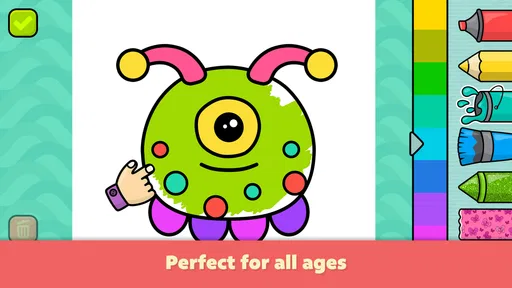
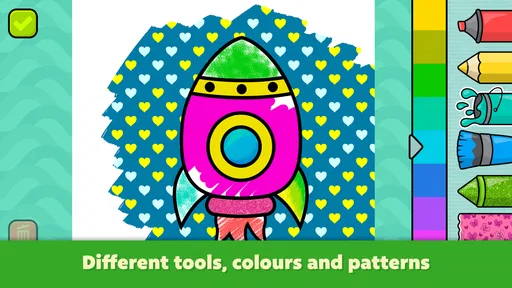


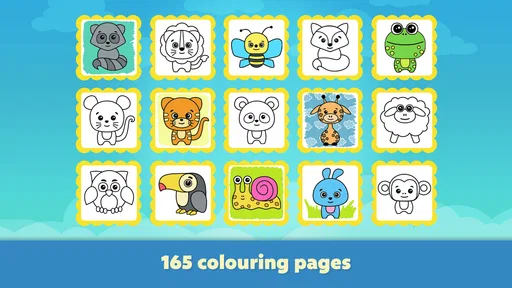
 Analysis by AppCompare
When I hand a young child a phone or tablet, I want the activity to be simple enough for them to start without a long explanation, but not so passive that they are just watching a screen. That is the appeal of Coloring Book - Games for Kids: it turns a familiar activity into a set of digital pages a child can explore at their own pace. I’d think of it as a handy option for a short, creative break, rather than a replacement for paper, crayons, or every other kind of play.
What to expect when opening it
This is an educational coloring game from Bimi Boo Kids Learning Games for Toddlers FZ-LLC. Its simple premise matters: a child chooses a drawing and colors it, without needing to learn a complicated game system first. The collection has more than 165 pages, so there is a reasonable amount to browse when a child finishes one picture and wants another. The overall experience is aimed at babies and toddlers, though the appeal of coloring itself can extend to older children who enjoy filling in pictures.
The first thing I would do with a new player is sit beside them for a moment, show them how to choose a page and change a color, then let them take over. That small introduction can prevent the familiar toddler frustration of tapping around without knowing how to get back to the picture. Once the basic rhythm is clear, the activity is easy to understand: pick, color, and move on when finished.
Speed, attention, and busy moments
Coloring is a relatively calm activity, and that makes this game useful in situations when a lively action game would be the wrong choice. A child can focus on one image instead of reacting to a fast stream of events. For a parent waiting at an appointment or sitting through a quiet stretch of travel, that difference can be valuable. I would still treat it as a short activity rather than assume it will hold every child’s attention for a long period; toddlers’ interest changes quickly, and a screen cannot guarantee a peaceful wait.
A practical routine is to offer it after the child has chosen a page, rather than hand over the device and expect them to work out the whole app while you are busy. If they are already tired or impatient, the choice of picture may matter more than the number of pages available. Letting them pick a familiar-looking subject can help them settle into the task; offering too many choices at once can have the opposite effect.
Using the coloring pages in everyday life
The free game is rated for everyone and has an average rating of 4.4 from around 28,000 ratings, with more than 5 million installs. Those figures suggest it has found a broad audience, but I would still judge it by whether its simple coloring format suits the child in front of you. The current version is 1.126, and it runs on Android 7.0 or later. It is free to download, with optional in-app purchases priced from $2.99 to $9.99 per item, so it is worth checking what is available before letting a child browse or tap through purchase screens.
Choosing it over paper or other apps
Compared with a paper coloring book, a digital page is easier to carry and does not leave crayon marks to clean up. That convenience makes the game a plausible choice for a restaurant wait or a quick pause between errands. Paper is still better when the goal is to practice holding a real crayon, feel different materials, or make marks freely outside pre-drawn outlines. I see the app as a useful complement, not a substitute for hands-on art.
Worth Reading Before You Choose

EA SPORTS FC Mobile 26 Is a Bigger Football Game, but It Takes Time

Flipboard Shows What News Apps Must Do Beyond the Feed

Switching to Android Auto Means Rethinking Your Driving Routine

Google Calendar Makes a Crowded Week Easier to Manage

Ludo King Makes the Most of the Minutes Between Plans

Baby Panda World Brings Quick Play to Modern Phones, but Its Game Library Feels Busy
It also occupies a different niche from open-ended drawing apps. A young child who wants a clear starting point may find a prepared picture reassuring, while a child eager to invent characters or draw anything they imagine may quickly want a blank canvas. The included coloring pages give the activity structure; that same structure is a limitation for children looking for unrestricted drawing. If your child asks to create a picture from scratch, paper or a drawing-focused app is likely the better next step.
Small choices that make a difference
For a toddler, I would keep the session simple: choose one picture together, name a few colors, and let the child decide where to use them. This turns the screen time into a small conversation rather than a silent handoff, and it avoids making the finished picture the only measure of success. A child may color outside the lines or use an unexpected combination; that is part of experimenting, not a problem to correct.
There is also a useful trade-off in having a ready-made page. It reduces the effort needed to begin, which is helpful for a child with a short attention span, but it can make the activity feel repetitive once the child has seen several similar pictures. When interest dips, I would switch activities instead of pushing for another page. The game works best as one option in a small rotation of books, toys, and offline drawing materials.
Features That Stand Out
The app offers a vast array of coloring pages, ranging from cute animals and whimsical creatures to intricate designs that even adults might find appealing. The selection is regularly updated, keeping things fresh and exciting.
One of the best features is the color palette. The app provides a wide spectrum of colors, and kids can mix and match to their heart's content. There’s even a magic brush tool that adds a bit of sparkle to their creations, making each artwork uniquely special.
Another cool feature is the ability to save and share the masterpieces. Kids can easily save their work and show it off to family and friends, or even print it out to hang on the fridge. It’s a neat way to preserve their digital art in a tangible form.
Kid-Friendly Design
The developers clearly had kids in mind when creating this app. There are no pesky ads popping up every few seconds, which means fewer interruptions and more time spent coloring. The controls are responsive and tailored for small fingers, making it easy for kids to switch colors and navigate through different pages.
In a busy household, I would also think about how the device itself affects the experience. A smaller screen can make tapping a particular area harder for a young child, while a larger tablet may feel more comfortable for coloring together. I would hand the device over at a stable table or on a lap rather than while a child is walking around, both to make careful taps easier and to reduce the chance of an accidental drop. The app’s basic activity should not demand a powerful gaming device, but I would close other demanding apps if an older or heavily used device feels sluggish.
Reliability and device habits
Because the game is designed around choosing and coloring pages, it does not ask a child to master a sequence of levels before getting to the main activity. That straightforward structure is a practical advantage if you are sharing a device: an adult can help the child return to the coloring task without needing to remember a complicated progression. If the app is interrupted, I would check what is on screen before handing the device back, rather than assume the child will know how to resume exactly where they left off.
The original appeal of using it away from home is that coloring can be done without an internet connection. I would still open the game at home before relying on it during a trip, so the child can get familiar with the controls and I can check that the pages I want to use are accessible. A little preparation is more useful than discovering a navigation snag when everyone is already waiting.
Who will enjoy it—and who may not
I can see this working especially well for a young child who likes choosing colors but is not yet ready to draw recognizable shapes from a blank page. It can also suit a caregiver who wants a contained activity for a short appointment wait, provided a device is appropriate in that setting. Older children who want detailed art tools, freehand creation, or a more challenging game may find the guided coloring format too limited. If your main goal is practicing pencil grip and hand pressure, physical coloring materials are the more direct choice.
The app is free to start, but optional purchases range from $2.99 to $9.99 per item. For a child using a shared device, I would review the purchase options and device settings in advance, and make it clear that choosing a page is different from buying one. That small bit of preparation keeps the activity focused on coloring rather than turning a casual tap into an unexpected expense.
Kid-Friendly Design
The developers clearly had kids in mind when creating this app. There are no pesky ads popping up every few seconds, which means fewer interruptions and more time spent coloring. The controls are responsive and tailored for small fingers, making it easy for kids to switch colors and navigate through different pages.
Why It’s a Hit with Parents
Parents are always on the lookout for apps that are both entertaining and educational, and this app hits the mark. It’s not just about filling in the lines; it helps children develop fine motor skills, enhance their creativity, and even learn about colors and patterns.
Furthermore, the app is a great way to keep kids occupied during those long car rides or while waiting at the doctor’s office. It’s fun, portable, and doesn’t require an internet connection, which is a huge plus.
One realistic use is a short wait before a family appointment: I would open the app before leaving, let the child select a picture, and keep the session to the length of the wait. If they finish early, we can talk about the colors they chose or move on to a small toy or book. This works better than promising that the game will occupy them for an entire journey, since a young child may lose interest even when there are many pages to choose from.
Room for Improvement?
While the app is pretty fantastic, there’s always room for growth. A feature that allows kids to create their own drawings from scratch would be a great addition. Also, introducing themed coloring packs, like seasonal or holiday-themed pages, could add a delightful twist to the experience.
Those limits help clarify who should skip it. If a child repeatedly wants to start with an empty page, or if an adult is looking for a full digital-art workspace, the prepared coloring format is unlikely to satisfy them for long. Likewise, families who prefer screen-free activities will get more from a paper coloring book. The advantage here is convenience and a guided starting point, not a deeper set of creative tools.
Performance in perspective
I would describe the expected pace as gentle rather than demanding: the central task is coloring a page, not coordinating rapid actions or managing a complex game. That makes it a sensible candidate for ordinary family devices, especially when the software is kept current and the device has room to run comfortably. The app’s current version is 1.126, and the minimum Android requirement is 7.0, so a device below that system level is not a fit.
For recovery after a distraction, I would keep expectations practical. If a call, lock screen, or another app interrupts a toddler, an adult may need to bring the coloring activity back up and help them find their place. That is not a special feature to rely on; it is simply a useful way to manage a shared device. I would avoid handing it over during a moment when the child needs uninterrupted supervision or when the device must remain available for something important.
Overall, Coloring Book - Games for Kids is a delightful app that brings the simple joy of coloring into the digital age. It’s easy to see why both kids and parents love it. The app offers endless hours of creativity and fun, and I highly recommend it for any parent looking to entertain their child in a constructive way. So, if you’re ready to unleash your child’s inner artist, give this app a try. Who knows, you might find yourself joining in on the fun too!
Pros
- Intuitive interface for easy navigation.
- Wide variety of coloring pages.
- Supports offline use for convenience.
- Encourages creativity in children.
- Regular updates add new content.
Cons
- Contains in-app purchases.
- Some ads may disrupt gameplay.
- Limited free content available.
- Requires device storage space.
- No option for custom templates.
FAQs for Coloring Book - Games for Kids
What age group is Coloring Book - Games for Kids suitable for?
Coloring Book - Games for Kids is designed primarily for children aged 3 to 8 years. The app features a user-friendly interface that is easy for young children to navigate. It offers a variety of coloring pages that cater to different interests and skill levels, making it both educational and entertaining for this age group.
Does the app require an internet connection to function?
No, Coloring Book - Games for Kids does not require an internet connection once it is downloaded. This makes it an excellent choice for parents looking to keep their children entertained during travel or in areas with limited connectivity. However, an internet connection might be needed for updates or downloading additional content.
Are there any in-app purchases or ads?
Coloring Book - Games for Kids offers a free version that includes ads and some basic coloring pages. There is also a premium version available, which provides an ad-free experience and access to additional coloring content. Parents can choose to make in-app purchases to enhance the app's offerings or to unlock specific features.
Is Coloring Book - Games for Kids safe for children?
Yes, the app is designed with children's safety in mind. It does not contain any inappropriate content and includes parental controls to prevent accidental purchases. The app is compliant with child safety regulations, ensuring a secure environment for children to explore their creativity.
What educational benefits does the app offer?
Coloring Book - Games for Kids encourages creativity and fine motor skills development. It introduces children to colors and shapes, enhances hand-eye coordination, and provides a platform for artistic expression. The app also includes educational elements such as numbers and letters, making it a well-rounded tool for early learning.


